:::meta
description: A complete tutorial for Tern, from the first line of a note to vocabularies, styling, diagnostics, the command line and publishing, with live examples throughout.
:::
::site-nav
# Guide {#top}
::toc
This guide takes you from an empty file to a finished note. It starts with the one line every note begins with, teaches the eight rules the syntax is built on, then walks through every construct, and ends with vocabularies, styling, the command line and publishing. Read it in order the first time; each section ends with a link to the reference page that covers the same ground in full.
## How to read this guide {#reading}
Most examples on this page are live. Each one shows its source, the result, the HTML Tern made from it, and its diagnostics. All four are computed by `tern.js` in your browser while you read, so they are always the engine's real output.
```tern {.live}
A *short* example with a formula, $x^2$.
```
- **No vocabulary.** An example renders as a plain note does, with no vocabulary. Some features, such as "Theorem 1" labels, only appear when a note declares a vocabulary. Examples that need one say so, and use the *demo vocabulary* listed on [the Vocabulary page](schema.html#demo-schema).
- **Problems on purpose.** Some examples show a mistake. Their diagnostics panel lists what Tern reports, and the text explains it.
- **Ids.** The ids inside an example's result are prefixed, so they never clash with this page's own.
## Your first note {#first-note}
A note is one HTML file. Its first line loads `tern.js`. Everything after that line is the note, written in Tern's syntax. When the browser opens the file, `tern.js` reads the note and renders it in place, as real HTML.
### The one line {#one-line}
```html
```
That line is the whole setup. It has three parts:
| Part | Why it is there |
|---|---|
| `` | Standards mode. Without it the browser uses quirks mode: the note still renders, but the layout and some add-ons misbehave and you get a `doc.quirks` error. |
| `` | The file is read as UTF-8, so accents, CJK text and symbols survive, wherever the file is served from. |
| `` | Loads the engine. The path is relative to the note: `../tern.js` from a subfolder. |
The script tag must be a plain one. With `async`, `defer` or `type="module"`, `tern.js` cannot read the rest of the file, and the note is not rendered.
### Writing and opening a note {#opening}
1. Download [`tern.js`](../tern.js), and [`addons/katex.js`](../addons/katex.js) for the math (keep it in an `addons/` subfolder), and put them in a folder.
2. Next to it, create `hello.html` with this content:
```html
# Hello
This is my first note. It has *emphasis*, a [link](https://example.com)
and a formula, $e^{i\pi} + 1 = 0$.
```
3. Open the file in your browser, by double-clicking it or dragging it onto a window. It works straight from disk, with no server and no build step.
The rendered result:
```tern {.live}
# Hello
This is my first note. It has *emphasis*, a [link](https://example.com)
and a formula, $e^{i\pi} + 1 = 0$.
```
When you open a note from disk, a small panel in the corner lists any problems Tern found, with their line numbers. Readers of a published note do not see it. [Diagnostics and the panel](#diagnostics) explains it.
:::note
The engine renders no math itself: it leaves each formula as its TeX. The `addons/katex.js` in `data-use` above typesets it with KaTeX, loaded from a CDN (jsDelivr); drop the add-on and the formula stays as `$e^{i\pi} + 1 = 0$`. See [Add-ons](addons.html#katex) for the math add-ons, and [Publishing](publishing.html#katex) for a copy of your own.
:::
### What happens when the file opens {#how-it-works}
- **The head.** Everything before the `tern.js` tag, the doctype and charset on its line included, is ordinary HTML that the browser reads first: a ``, `<html lang>`, icons, stylesheets. Tern keeps it, and adds only what a `:::meta` block sets (see [Metadata](#metadata)) and a few defaults, such as a viewport.
- **The note.** Everything after the line is the note. `tern.js` takes it as text, so the browser never sees it as HTML.
- **Rendering.** Tern parses the note, works out ids, numbers and references, writes HTML, and puts it in the page inside `<main class="tern">`. Scripts in the note then run, in order. If a [math add-on](addons.html#katex) is loaded, it typesets the formulas; otherwise each stays as its TeX.
- **The same everywhere.** The command line and the editor use the same engine on the same file, so what they report is what the browser renders.
You never need to write the line by hand: `tern new` writes it, with the right path to `tern.js` (see [The workflow](#workflow)).
**Reference:** [The file](publishing.html#the-file), [opening locally](publishing.html#local), [tern new](tools.html#new).
## The eight rules {#rules}
Every construct in Tern follows from eight rules. Learn them once, and the rest of the syntax stops surprising you.
### 1. A block is decided by its first line {#rule-lines}
You can tell what a line starts by looking at that line alone: `#` starts a heading, `:::` a block, `>` a quote, `-` a list item. The one exception is a table, whose first row needs the delimiter row under it. A block's end is fixed when it opens: a heading ends on its line, a fence at its closing fence, a `:::` block at its closer. Nothing further down can change what came before.
```tern {.live}
:::aside
An aside opens on its first line and ends at its closer.
:::
```
### 2. Indentation does not matter, with two exceptions {#rule-indent}
You can indent freely to make the source readable. Indentation matters in only two places:
- **list items and footnotes**, where it decides which lines belong to the item;
- **fences and display math**, whose content loses the indentation of its opening line.
There are no indented code blocks: four spaces in front of a line change nothing.
```tern {.live}
:::aside
Indented four spaces: still a paragraph.
Eight spaces: still a paragraph.
:::
```
### 3. Trailing whitespace means nothing {#rule-trailing}
Lines are trimmed at the end before Tern looks at them, so your editor may strip trailing spaces freely. A line break is never two trailing spaces: it is a backslash at the end of the line (see [Paragraphs](#paragraphs)).
### 4. Two alphabets: Tern's and TeX's {#rule-alphabets}
Tern's marks are `:` `[ ]` `{ }` `@` `#` `|` `>` `*` `~~` `==`, the backtick and `$`. TeX's are `\`, `{ }`, `^`, `_` and `&`. Inside math everything is TeX and Tern looks at nothing. Outside math, a backslash before a letter is just a backslash, so paths and TeX names in prose stay as you typed them.
```tern {.live}
Outside math, \alpha and C:\Users\me are text; inside, $\alpha$ is TeX.
```
### 5. One attribute grammar {#rule-attributes}
Attributes are always written in braces, `{#id .class key=value}`, and always in the same few places: after a link, image, span, inline element or reference; after a code span, formula or emphasis; at the end of a block's first line; at the end of a heading; or on a line of their own before a block.
```tern {.live}
## Results {#results .wide}
{.lead}
A paragraph with a [button](/go){.btn} and **bold**{.key} text.
```
### 6. Elements are names {#rule-names}
`:::name`, `::name` and `:name[…]` become the HTML element the name denotes: `:::aside` is an `<aside>`, `::video` a `<video>`, `:kbd[…]` a `<kbd>`. A lower-case name with a hyphen, such as `tide-chart`, is a custom element. Any other name becomes a `div` or `span` with the name as its class, ready for your CSS.
```tern {.live}
:::aside
An aside.
:::
:::idea
A name HTML does not know becomes `div.idea`.
:::
Press :kbd[Esc] to leave insert mode.
```
### 7. Nothing is lost silently {#rule-diagnostics}
Malformed markup stays visible where you wrote it, and Tern reports a *diagnostic*: a code, a severity, a message, a position, and a hint that spells the fix. When Tern has to drop something, such as a second definition of the same footnote, it says so. An **error** means content was lost or its meaning changed; a **warning** means it is probably not what you meant; an **info** is a hint.
```tern {.live expect="block.opener-junk"}
:::aside Danger
The title should be in brackets: `:::aside[Danger]`.
:::
```
### 8. One spelling per construct {#rule-spelling}
Each construct has one documented spelling, and this guide teaches only that one. A few Markdown habits are still accepted, such as `***` for a rule and `~~~` for a fence, but you never need them.
**Reference:** [The eight rules](syntax-blocks.html#rules).
## The constructs at a glance {#constructs}
Everything this guide teaches, on one screen.
| Construct | You write | You get |
|---|---|---|
| Paragraph | lines of text, with a blank line between paragraphs | `<p>` |
| Line break | `\` at the end of a line | `<br>` |
| Emphasis, strong | `*em*`, `**strong**` | `<em>`, `<strong>` |
| Strikethrough, highlight | `~~gone~~`, `==key==` | `<del>`, `<mark>` |
| Code span | `` `code` `` | `<code>` |
| Inline math | `$x^2$`, or `` $`]0,1[` `` for awkward TeX | `span.t-math`, typeset by a [math add-on](addons.html#katex) |
| Heading | `## Title {#id}` | `<h2 id="id">`, with an id made from the text when you give none |
| Link | `[text](https://x.org "Title")` | `<a href>` |
| Image | `{width=50%}` | `<img>` |
| Autolink | `<https://x.org>`, or a bare `https://x.org` | `<a>` |
| List | `- item`, `1. item`, `- [x] done` | `<ul>`, `<ol>`, task items |
| Quote | `> text` | `<blockquote>` |
| Rule | `---` | `<hr>` |
| Fence | ```` ```js[Title]{lines} ```` … ```` ``` ```` | `<pre><code>`; with a title, a listing |
| Display math | `$$` … `$$ {#eq-id}` | `div.t-eq`; numbered when it has an id |
| Table | `| a | b |`, then `|---|---|` | `<table>` |
| Block | `:::name[Title]{attrs}` … `:::` | the element the name denotes, else `div.name` |
| Cell | `+++` inside a block | `div.t-cell`, in a grid |
| Leaf | `::name[content]{attrs}`, alone on a line | the element the name denotes, else `div.name` |
| Inline element | `:name[content]{attrs}` | the element the name denotes, else `span.name` |
| Span | `[text]{.class}` | `<span class="class">` |
| Attributes | `{#id .class key=value}` | `id`, `class` and other attributes |
| Attribute line | `{.lead}` alone on the line before a block | the attributes, on that block |
| Reference | `@id`, `@id{ref=title}` | a link whose text comes from the target: "Theorem 1", "(2)", a title |
| Footnote | `[^a]` in the text, `[^a]: …` anywhere | a numbered note at the end |
| Metadata | `:::meta` with `key: value` lines | `<title>`, `<html lang>`, `<meta>` |
| Macros | `:::macros` with `\gdef` lines | TeX macros shared by every formula |
| Raw HTML | a block tag on its own line; `<b>` and other inline tags in text; a ```` ```=html ```` fence | the HTML, as written |
| Escape | `\` before any ASCII punctuation | the character itself |
**Reference:** [Syntax: blocks](syntax-blocks.html#top) and [Syntax: inline](syntax-inline.html#top).
## Paragraphs and line breaks {#paragraphs}
A paragraph is a run of lines that start nothing else. A blank line ends it. The lines of a paragraph are joined: a single line break in the source is a soft break, which the browser shows as a space.
```tern {.live}
A paragraph can span
several lines in the source.
A blank line starts the next one.
```
To force a line break, end the line with a backslash. In HTML it is a `<br>`.
```tern {.live}
Roses are red,\
violets are blue.
```
- **Leading spaces** on a paragraph line are dropped, so you can indent continuation lines.
- **A backslash on the last line** of a paragraph is a literal backslash: there is nothing after it to break to.
- **Two trailing spaces** do nothing (rule 3). Use the backslash.
`\\` at the end of a line is an escaped backslash, not a break. Tern prints one backslash and tells you, in case you meant a line break, as in LaTeX:
```tern {.live expect="latex.linebreak"}
In LaTeX this is a break,\\
in Tern it is a backslash.
```
**Reference:** [Paragraphs](syntax-blocks.html#paragraph), [hard breaks](syntax-inline.html#hard-break), [`latex.linebreak`](diagnostics.html#latex-linebreak).
## Emphasis, code and highlight {#emphasis}
| You write | You get |
|---|---|
| `*emphasis*` | *emphasis*, `<em>` |
| `**strong**` | **strong**, `<strong>` |
| `***both***` | ***both*** |
| `~~struck~~` | ~~struck~~, `<del>` |
| `==highlight==` | ==highlight==, `<mark>` |
| `` `code` `` | `code`, `<code>` |
```tern {.live}
Use *emphasis*, **strong**, ***both***, ~~strikethrough~~ and ==highlight==,
or `code` for anything typed literally.
```
### Rules worth knowing {#emphasis-rules}
- **Only the asterisk** makes emphasis. Underscores are always text, so `snake_case`, `__init__` and URLs with underscores need no escaping.
- **Spaces around** an asterisk make it text: `2 * 3 * 4` stays as typed.
- **`~~` and `==`** take exactly two characters, and they do not open or close when glued to an ASCII letter or digit on the outside. `a==b` and `x == y` are text.
```tern {.live}
snake_case, __init__ and _private_ stay as typed.
2 * 3 * 4 is arithmetic, a==b and x == y are comparisons,
but (==this==) is highlighted.
```
Highlight and strikethrough work inside words of languages without spaces, because only ASCII letters and digits count as glue:
```tern {.live}
これは==重要==です。
```
### Code spans {#code-spans}
A code span shows its content exactly, with nothing inside it interpreted. To put a backtick inside, wrap the span in a longer run of backticks; a space just inside each end is removed, so a span can start or end with a backtick.
```tern {.live}
`a < b && c > d`, ``a`b``, and a lone backtick: `` ` ``.
```
### Escapes {#escapes}
A backslash before any ASCII punctuation character makes that character literal: `\*`, `\$`, `\@`, `\[`, `\#`, `\\`. A backslash before anything else is just a backslash.
```tern {.live}
\*not emphasis\*, a price of \$5, an \@handle, \[not a link\](x),
and a backslash: \\.
```
At the start of a line, an escape stops a block from starting:
```tern {.live}
\# Not a heading.
\- Not a list item.
1\. Not a numbered item.
\> Not a quote.
\::: not a block, \::not-a-leaf
\$$ not display math
\{.not-attributes}
\+++ \--- \[^1]
```
Each section below ends its rules with the escape for its construct, when it has one.
**Reference:** [emphasis](syntax-inline.html#emphasis), [strikethrough](syntax-inline.html#strikethrough), [highlight](syntax-inline.html#highlight), [code spans](syntax-inline.html#code-span), [escapes](syntax-inline.html#escapes).
## Headings and their ids {#headings}
One to six `#`, a space, and the heading's text. A heading is always one line.
```tern {.live}
# A level-one heading
## Level two
### Level three
```
### Ids {#heading-ids}
Every heading gets an `id`, so you can link to it. When you write none, Tern makes one from the heading's text: lower-cased, with runs of spaces and punctuation turned into `-`, and anything before the first letter dropped. Letters of every script are kept.
```tern {.live}
## Kernel and image
## Überblick
## 2. Results
## 日本語
```
To choose the id yourself, put `{#id}` at the end of the line. Classes and other attributes can go in the same braces:
```tern {.live}
## Kernel and image {#kernel .wide}
```
- **Collisions.** When a made-up id is already taken, the next heading gets `-2`, `-3` and so on, silently. An id you wrote yourself always wins over a made-up one.
- **Choose ids for anything you link to.** A made-up id changes when you reword the heading; one you wrote does not.
```tern {.live}
## Setup
## Setup
## Setup
```
### What is not a heading {#not-a-heading}
- `#hashtag` and `#1 priority`: the `#` must be followed by a space.
- A line underlined with `===` or `---`: Tern has no underlined headings. `---` after a paragraph is a rule.
- A closing run of `#` is part of the text: `# C# #` keeps both.
```tern {.live}
#hashtag stays text.
# C# #
Title
===
```
**Reference:** [headings](syntax-blocks.html#heading), [ids](elements.html#ids).
## Links and images {#links}
A link is the text in brackets, then the destination in parentheses, with an optional title in quotes.
```tern {.live}
Read [the guide](guide.html), or [the spec](https://example.com/spec "Normative").
```
- **Spaces in a destination**: wrap it in angle brackets, `[my file](<my file.html>)`. Non-ASCII characters are percent-encoded for you.
- **Attributes** go in braces right after the link: `[Download](notes.pdf){.button download}`.
- **No reference-style links.** `[text][label]` is plain text. Write the destination inline.
```tern {.live}
[my file](<my file.html>), [café](café.html), [Download](notes.pdf){.button download}.
```
### Autolinks {#autolinks}
A URL in angle brackets becomes a link, and so does an e-mail address. A bare `http://` or `https://` URL is linked too. It stops at a space or a bracket, and trailing punctuation is left out, so a URL can end a sentence.
```tern {.live}
<https://example.com>, <me@example.org>, and a bare https://example.com/docs.
Parentheses that belong to it stay: https://en.wikipedia.org/wiki/Tern_(bird).
```
To keep a URL as text, escape its colon: `https\://example.com`.
### Links inside the note {#fragment-links}
`[text](#id)` links to an id in the same note. Tern checks it: a fragment that names no id gets a warning, and the link stays a link.
```tern {.live expect="ref.dangling"}
## Setup {#setup}
See [the setup](#setup), and [nothing](#nowhere).
```
For a link whose text comes from its target, such as "Theorem 2", use a reference, `@id`, covered in [References](#references).
### Images {#images}
An image is a link with `!` in front. The bracket text is the alternative text, read aloud by screen readers and shown when the image cannot load.
```tern {.live}
{width=320}
A feather {width=24} can sit inside a sentence.
```
- **Paths** are relative to the note, as in any HTML page.
- **Attributes** set the size and anything else: `{width=50%}`, `{loading=lazy}`.
- **Empty brackets** give an empty `alt`, right for a purely decorative image.
- **`alt=`** wins over the bracket text when you give both: `{alt="A plane and a line"}`.
- **An image with an id becomes a figure**, with the bracket text as its caption. See [Figures](#figures).
**Reference:** [links](syntax-inline.html#links), [images](syntax-inline.html#images), [autolinks](syntax-inline.html#autolinks).
## Lists and tasks {#lists}
Bullet items start with `-`, numbered items with a number and `.` or `)`. Indent a nested list under the text of its item.
```tern {.live}
- Milk
- Bread
- white
- rye
- Eggs
1. Preheat the oven.
2. Mix.
3. Bake.
```
- **Start number.** A numbered list keeps its first number: `7.` starts at 7.
- **One list or two.** Changing the bullet character (`-`, `*`, `+`) or the delimiter (`.` or `)`) starts a new list.
- **Tight or loose.** A blank line between items makes the list loose: each item becomes a paragraph, with more space. (Below, the `*` bullets start a second list, so the first one stays tight.)
```tern {.live}
7. seven
8. eight
- a tight
- list
* a loose
* list
```
### Tasks {#tasks}
An item that starts with `[ ]` or `[x]` is a task: it gets a checkbox, ticked or not, which the reader cannot change.
```tern {.live}
- [x] Motions
- [ ] Operators
- [x] `d`, `c`, `y`
- [ ] text objects
- [ ]
```
### Blocks inside items {#list-blocks}
Anything can go inside an item: paragraphs, fences, tables, math, `:::` blocks. Indent it to where the item's text starts. Here the blank lines between the parts make the list loose.
````tern {.live}
1. Install the tools:
```sh
npm install
```
2. Read the note:
:::aside
Inside the second item.
:::
````
### Numbers in prose {#list-prose}
A numbered item can interrupt a paragraph only when it is numbered 1, so a wrapped line that starts with a year stays prose. After a blank line, though, a line starting `2019.` is a list item; escape the dot to keep it text.
```tern {.live}
The project started in
2019. It grew from there.
2019\. was the year it started.
```
**Reference:** [lists](syntax-blocks.html#lists).
## Quotes {#quotes}
A quote is a run of lines starting with `>` and a space. Lines that merely continue a paragraph may leave out the `>`. Anything can go inside a quote, including lists and blocks.
```tern {.live}
> The best way to predict the future
is to invent it.
>
> - a list inside
> - the quote
```
- **Nesting.** `> >` starts a quote inside a quote.
- **`>` needs a space** (or the end of the line) to open a quote, so `>5 people` and `>= 3` are text.
- **Literally:** `\>` at the start of a line.
```tern {.live}
> :::aside
> A block inside a quote.
> :::
>5 people and >= 3 are text.
```
**Reference:** [blockquotes](syntax-blocks.html#blockquote).
## Code fences {#code}
A fence is three backticks, an optional language, the code, and three backticks. The code is shown exactly as written.
````tern {.live}
```python
def greet(name):
return f"Hello, {name}!"
```
````
The language becomes the class `language-python` on `<code>`, which syntax highlighters look for. Tern itself does not colour code. To start a line with three backticks as text, escape the first one: ```` \``` ````.
### Line numbers and highlights {#code-lines}
Three settings go in braces after the language:
| Setting | Effect |
|---|---|
| `lines` | numbers every line |
| `start=10` | starts the numbering at 10 |
| `hl=2,4-5` | highlights those lines, counted as displayed |
````tern {.live}
```js {lines start=10 hl=11}
const a = 1;
const b = 2;
console.log(a + b);
```
````
Other attributes, such as a class, go in the same braces and land on the `<pre>` (on the `<figure>`, for a titled fence).
### Titled fences: listings {#listings}
A title in brackets after the language turns the fence into a listing: a `<figure>` with the title as its caption. Give it an id to link to it.
````tern {.live}
```js[A lazy Fibonacci generator]{#lst-fib}
function* fib() {
let [a, b] = [0, 1];
for (;;) { yield a; [a, b] = [b, a + b]; }
}
```
@lst-fib never ends; take what you need.
````
With no vocabulary, the reference shows the title. A vocabulary that declares `code` with a counter and a label numbers listings, and the reference reads "Listing 1". Here is the same source with the demo vocabulary:
````tern {.live schema=demo}
```js[A lazy Fibonacci generator]{#lst-fib}
function* fib() {
let [a, b] = [0, 1];
for (;;) { yield a; [a, b] = [b, a + b]; }
}
```
@lst-fib never ends; take what you need.
````
### Diagrams {#diagrams}
With the Mermaid add-on, a fence in the language `mermaid` is drawn as a diagram, in the theme's colours: flowcharts, sequence diagrams, Gantt charts and the rest of Mermaid's diagrams.
```html
<!doctype html><meta charset="utf-8"><script src="tern.js" data-use="addons/mermaid.js"></script>
```
````tern
```mermaid
flowchart LR
A[Write] --> B[Check] --> C[Publish]
```
````
Put it in a `:::figure` to give it a caption and a number. The [Add-ons](addons.html#mermaid) page has the colours, the options and how to use it offline.
### Fences inside fences {#fence-in-fence}
Everything inside a fence is code, including `:::`, `$$` and `#` lines. To show a fence in a fence, make the outer one longer:
`````tern {.live}
````md
```js
x = 1
```
````
`````
### When a fence goes wrong {#fence-problems}
A fence that is never closed runs to the end of the note, or of the list item or quote it is in, and is reported as an error:
````tern {.live expect="block.unclosed-fence"}
```js
let x = 1;
The rest of the note became code.
````
The info after the backticks is a language, then a `[Title]`, then a `{…}` group, in that order. Anything else is kept in `data-meta` on the `<pre>`, with a warning:
````tern {.live expect="fence.info-junk"}
```js extra words
x = 1;
```
````
**Reference:** [fences](syntax-blocks.html#fence), [`block.unclosed-fence`](diagnostics.html#block-unclosed-fence), [`fence.info-junk`](diagnostics.html#fence-info-junk).
## Math {#math}
Math is written in TeX between dollars. The engine parses it but renders nothing itself: each formula is left as its TeX, the way a code fence stays plain without [`code.js`](addons.html#code). To typeset it, load a [math add-on](addons.html#katex) in `data-use` — `addons/katex.js` for KaTeX, or `addons/mathml.js` for native MathML. Inside math, everything is TeX: Tern's marks mean nothing there (rule 4).
### Inline math {#inline-math}
```tern {.live}
The sum $\sum_{i=1}^{n} x_i^*$ adds every optimum $x_i^*$,
and $e^{i\pi} + 1 = 0$ is famous.
```
### Dollars that are prices {#prices}
Prose is full of dollar signs, so Tern only treats a pair of dollars as math when it looks like math:
- the opening `$` is followed by a non-space;
- the closing `$` follows a non-space, and is not followed by a digit;
- the two are at most one line break apart;
- the first `$` after the opener decides: if it cannot close, the opener is text.
So ordinary prices need no escaping. The reference lists a few more cases, such as a `$` inside parentheses.
```tern {.live}
It costs $5, or $10 at peak hours. Tickets are $5–$10.
The $0$th, $1$st and $n$th terms are math.
```
When a price and a formula share a sentence, the first dollar may pair with the wrong one. Tern warns when a "formula" starts with a digit and holds words. Escape the price with `\$`:
```tern {.live expect="math.suspect-price"}
It costs $5 then x$ more.
It costs \$5, then $x$ more.
```
### Verbatim math {#verbatim-math}
When TeX itself contains a dollar, or an interval such as `]0,1[` that the dollar rules turn down, write `` $`…` ``: a dollar followed by a backtick span. It is always math.
```tern {.live expect="math.bracket"}
The interval $`]0,1[` is open, and $`\$5 + \$10` is TeX's dollar.
$]0,1[$ is not math, and Tern says how to write it.
```
### Display math {#display-math}
A formula on its own lines goes between two `$$` lines. A short one can stay on one line.
```tern {.live}
$$
\dim V = \dim \ker T + \dim \operatorname{im} T.
$$
$$ e^{i\pi} + 1 = 0 $$
```
- **No blank lines** inside: TeX forbids them, and Tern uses that to recover from a forgotten `$$`.
- **`$$` in the middle of a line** is text. For a large formula inside a sentence, write `$\displaystyle …$`.
- **Literally:** `\$` for a dollar anywhere, `\$$` at the start of a line.
A blank line, a heading, a fence or a `:::` line ends a display formula that was never closed. The source stays visible in red, the error names the line, and nothing after it is swallowed:
```tern {.live expect="math.unclosed"}
$$
a^2 + b^2 = c^2
## The next heading survives
```
### Numbered equations {#equations}
Give a display formula an id, after its closing `$$`, and it is numbered. `@id` refers to it as "(1)".
```tern {.live}
$$
\dim V = \dim \ker T + \dim \operatorname{im} T.
$$ {#eq-rn}
$$ e^{i\pi} + 1 = 0 $$ {#eq-euler}
By @eq-rn and @eq-euler, …
```
- **Only formulas with an id** are numbered, in document order. Inline math is never numbered.
- **Attributes go after the closer.** On the opening `$$` line, braces are TeX: below, `{.wide}` is typeset as part of the formula, and Tern reports an error.
```tern {.live expect="math.opener-tail"}
$$ {.wide}
x = 1
$$
```
### Macros {#macros}
A `:::macros` block defines TeX macros for every formula in the note. Its body is TeX, read as written.
```tern {.live}
:::macros
\gdef\R{\mathbb{R}}
\gdef\norm#1{\lVert #1 \rVert}
:::
For every $x \in \R^n$, $\norm{x} \ge 0$.
```
All macro blocks are read before any formula is typeset, so a macro works anywhere in the note. The block itself is hidden.
**Reference:** [inline math](syntax-inline.html#inline-math), [verbatim math](syntax-inline.html#verbatim-math), [display math](syntax-blocks.html#display-math), [macros](syntax-blocks.html#raw-body), [numbering](elements.html#numbering).
## Tables {#tables}
A table is a header row, a delimiter row, and body rows. Every row starts with `|`.
```tern {.live}
| Phase | Weeks | Owner |
|---|--:|:-:|
| Engine | 4 | O.C. |
| Runtime | 3 | O.C. |
```
- **Alignment** comes from colons in the delimiter row: `:--` left, `--:` right, `:-:` centred.
- **A trailing `|`** is optional.
- **Cells** hold inline content: emphasis, code, math, links, elements.
- **Missing cells** are left empty. **Extra cells** are kept, with a warning.
### Pipes in cells {#table-pipes}
A pipe inside code or math does not split a cell. Anywhere else, escape it as `\|`.
```tern {.live}
| Input | Meaning |
|---|---|
| `a|b` | a pipe in code |
| $|x|$ | absolute value |
| either \| or | an escaped pipe |
```
### Long rows {#table-continuation}
A row that ends with a single `\` continues on the next line, after a line break. Use it for long cells.
```tern {.live}
| Phase | Exit criterion |
|---|---|
| P3 | smoke tests green;\
no math task over 50 ms |
```
### Attributes and captions {#table-captions}
An attribute line before a table puts attributes on `<table>`. To give a table a caption, wrap it in `:::table[Caption]`; the block and the table merge into one `<table>` with a `<caption>`.
```tern {.live}
:::table[Phases and exit criteria]{#tbl-phases .wide}
| Phase | Exit |
|---|---|
| P0 | every rule has a case |
:::
See @tbl-phases.
```
With a vocabulary that gives `table` a counter, the caption gains "Table 1" and the reference reads "Table 1" (demo vocabulary):
```tern {.live schema=demo}
:::table[Phases and exit criteria]{#tbl-phases}
| Phase | Exit |
|---|---|
| P0 | every rule has a case |
:::
See @tbl-phases.
```
### Tables without a header {#headerless}
A delimiter row at the start makes a table with no header:
```tern {.live}
|---|--:|
| apples | 3 |
| pears | 12 |
```
### Table mistakes {#table-problems}
A table must start with `|`. The Markdown habit of leaving out the outer pipes gives a paragraph, and a warning on the delimiter row:
```tern {.live expect="table.stray-delimiter"}
Keys | Action
---|---
w | next word
```
A row with more cells than the header keeps them, with a warning:
```tern {.live expect="table.extra-cell"}
| a | b |
|---|---|
| 1 | 2 | 3 |
```
**Reference:** [tables](syntax-blocks.html#tables), [table captions](elements.html#table-caption), [`table.stray-delimiter`](diagnostics.html#table-stray-delimiter).
## Blocks with `:::` {#blocks}
A block wraps any content in an element. It opens with three colons and a name, and closes with three colons.
```tern {.live}
:::aside
An aside can hold *anything*: paragraphs, lists, math, tables, other blocks.
:::
```
### Names become elements {#block-names}
The name decides the element (rule 6):
- **An HTML name** that may hold flow content becomes that element: `aside`, `section`, `article`, `details`, `figure`, `nav`, `header`, `footer`, `div` and others.
- **A lower-case name with a hyphen**, such as `:::tide-chart`, becomes that custom element.
- **Any other name** becomes a `div`, with the name as its class.
Every block gets the class `t-block`, its name as a class, and `data-t="name"`, so CSS and scripts can find it whatever its element.
```tern {.live}
:::section
A real `<section>`.
:::
:::tide-chart
A custom element, `<tide-chart>`.
:::
:::idea
`<div class="t-block idea">`.
:::
```
To start a paragraph with three colons, escape the first: `\:::`. Names are case-sensitive: `:::Aside` is not `aside`, it is `div.Aside`. A few names are reserved and never produce their element, such as `script`, `style`, `main` and `body`; Tern says so when you use one.
### Titles {#block-titles}
A title goes in brackets right after the name. It can hold inline markup.
```tern {.live}
:::idea[Key *idea*]
A title becomes the block's first child, `div.t-title`.
:::
:::details[Show the answer]
The answer is 42.
:::
```
Some elements put the title in their own slot: a `details` block's title is its `<summary>`, a `figure`'s is its `<figcaption>`, a `table`'s its `<caption>`, a `fieldset`'s its `<legend>`.
### Attributes on a block {#block-attributes}
Braces at the end of the opening line give the block an id, classes and attributes. A bare word sets a boolean attribute, such as `open` on `details`.
```tern {.live}
:::details[More]{#more .muted open}
Open from the start.
:::
```
### Nesting and closers {#closers}
Blocks nest. A bare `:::` closes the innermost open block. To close a block by name, write `:::/name`: it closes that block and everything still open inside it.
```tern {.live}
:::section
:::aside
Inside the aside.
:::
Back in the section.
:::/section
```
Use named closers for long blocks; they also let you see at a glance what is closing.
The number of colons is up to you. More colons can make an outer block stand out, as long as each closer repeats its opener's count:
```tern {.live}
::::section
:::aside
Inner.
:::
::::
```
The count never chooses which block closes: a bare closer always closes the innermost one. When its count differs from that block's opener, Tern points it out, and suggests a named closer:
```tern {.live expect="block.closer-count"}
:::section
:::aside
Inner.
::::
:::
```
### Block mistakes {#block-problems}
A block that is never closed runs to the end of the note, and the error points at its opener:
```tern {.live expect="block.unclosed"}
:::aside
This aside is never closed.
Everything below ends up inside it.
```
A named closer closes everything open inside the block it names. Blocks it closes that way are reported, each at its own opener:
```tern {.live expect="block.unclosed"}
:::section
:::aside
The aside's closer is missing.
:::/section
After the section.
```
The most common opener mistakes keep the block and show the stray text in red:
```tern {.live expect="block.opener-junk block.opener-junk"}
:::aside Danger
A title goes in brackets.
:::
:::aside[Danger] #warn .big
Attributes go in braces.
:::
```
A space after the colons, or a `:::` with nothing open, is text with a warning:
```tern {.live expect="block.spaced-name block.stray-closer"}
::: aside
is text.
:::
```
### Cells and grids {#cells}
Inside a block, a `+++` line starts a new cell. A block with cells becomes a grid, one column per cell. `cols` sets the column widths: a number of equal columns, or a list of relative widths.
```tern {.live}
:::row{cols="2 1"}
Left, twice as wide as the right.
+++
Right.
:::
```
- **Cell attributes** go after the `+++`: `+++ {.muted}`.
- **A first `+++`** right after the opener carries the first cell's attributes.
- **`cols` without cells** makes the block's own children the grid items, for example a block of cards.
- A list entry in `cols` that is not a number, such as `12rem`, is used as written.
- On narrow screens, every grid becomes one column.
- **Literally:** `\+++`.
```tern {.live}
:::row
+++ {.muted}
First cell.
+++ {.lead}
Second cell.
:::
:::cards{cols=3}
:::card[Parser]
Positions on every node.
:::
:::card[Runtime]
Renders in place.
:::
:::card[Editor]
A language server.
:::
:::/cards
```
A `+++` outside any block is text, with a warning:
```tern {.live expect="cell.orphan"}
+++
Not in a block.
```
### Raw bodies {#raw-bodies}
`{raw}` on a block keeps its body as plain text, for a script to read: a diagram description, data, a chart. Nothing in it is parsed.
```tern {.live}
:::mermaid{raw}
graph TD; A-->B
*not emphasis*
:::
```
`:::macros` and `:::meta` always have raw bodies.
### Choosing the element {#tag}
`{tag=…}` picks the element for one block, from the same list of HTML names:
```tern {.live}
:::note{tag=aside}
A note that is an `<aside>`.
:::
```
`tag=` works only on `:::`, `::` and `:` elements. On a span, link, heading or attribute line it is dropped, with a warning:
```tern {.live expect="tag.not-allowed"}
A [span]{tag=b} stays a span.
```
**Reference:** [containers](syntax-blocks.html#container), [closers](syntax-blocks.html#closer), [cells](syntax-blocks.html#cells), [names](elements.html#names), [allowlists](elements.html#allowlists), [title slots](elements.html#title-slots), [`block.unclosed`](diagnostics.html#block-unclosed).
## Leaves and inline elements {#elements}
### Leaves {#leaves}
A leaf is an element on one line: two colons, a name, optional content in brackets, optional attributes in braces. The line must hold nothing else. Leaves are how a note embeds media and web components without writing HTML. A video, for example:
```tern
::video{src=media/tide.mp4 poster=media/tide.jpg controls width=640}
```
becomes `<video class="video" data-t="video" src="media/tide.mp4" poster="media/tide.jpg" controls width="640"></video>`. The same goes for an embedded page, a web component, or a name of your own:
```tern {.live}
::iframe{src=../examples/img/estuary-map.svg width=320 height=180 loading=lazy title="Estuary map"}
::tide-clock{station=leith units=m}
::byline[Lecture 7 · *O. Carrera*]
```
- **Media and embeds**: `video`, `audio`, `img`, `iframe`, `embed`, `object`, `picture`, `canvas`. An `::iframe` can show a map or a video player from another site, as in `::iframe{src="https://www.openstreetmap.org/export/embed.html?bbox=-3.2,55.95,-3.1,56.0" width=640 height=360}`.
- **Other HTML**: `hr`, `p`, `figcaption`, `summary`, and the block names.
- **A lower-case name with a hyphen** is a web component: `::tide-clock` is `<tide-clock>`, ready for your `customElements.define`.
- **Anything else** is a `div` with the name as its class.
- **Literally:** `\::` at the start of a line.
A line that starts with `::name` but has more text after it is a paragraph, with a hint:
```tern {.live expect="leaf.demoted"}
::before and ::after are CSS pseudo-elements.
```
An element that cannot hold content, such as `hr`, puts what its brackets held after it, with a warning:
```tern {.live expect="leaf.void-content"}
::hr[The end]
```
### Inline elements {#inline-elements}
Inside text, `:name[content]` makes an element. The content can hold any inline markup, and braces after it hold attributes.
```tern {.live}
Press :kbd[Ctrl]+:kbd[S] to save.
:abbr[HTML]{title="HyperText Markup Language"} is a :dfn[markup language].
Ruby text: :ruby[漢:rt[kan]字:rt[ji]].
A :term[defined term] and a :my-badge[web component]{level=2}.
```
- **Inline names** become phrasing elements only: `kbd`, `abbr`, `dfn`, `cite`, `q`, `sub`, `sup`, `small`, `time`, `ruby`, `rt` and others. A name like `aside` is a `span.aside` here, because a block element cannot sit inside a paragraph.
- **The colon must not be glued** to a letter or digit before it. `press:kbd[S]` stays text, with a hint; so do times like `10:30[x]`.
- **Literally:** `\:kbd[x]`.
```tern {.live expect="inline.glued"}
Glued: press:kbd[S]. Spaced: press :kbd[S]. A time, 10:30[x], stays text.
```
For a subscript glued to a word, as in a chemical formula, use the HTML tag: `H<sub>2</sub>O`.
### Spans {#spans}
Brackets followed directly by braces make a plain `<span>` with those attributes. It is the way to put a class on a few words.
```tern {.live}
A [defined term]{.term} and an [answer]{.spoiler hidden}.
```
**Reference:** [leaves](syntax-blocks.html#leaf), [inline elements](syntax-inline.html#inline-element), [spans](syntax-inline.html#span), [allowlists](elements.html#allowlists).
## Attributes everywhere {#attributes}
One grammar, `{#id .class key=value}`, gives attributes to anything.
| Item | Means |
|---|---|
| `#id` | the `id` |
| `.class` | a class; several accumulate |
| `key=value` | an attribute; quote the value if it has spaces: `title="Two words"` |
| `key` alone | a boolean attribute, such as `open`, `controls` or `hidden` |
```tern {.live}
{#intro .lead data-level=1}
An introduction, with a [link](https://example.com){target=_blank rel=noopener},
`code`{.lang-js}, a formula $x${#ex}, **strong**{.key}, and a [span]{title="Two words"}.
```
### Where braces go {#attribute-places}
| Place | Example |
|---|---|
| right after a link, image, span, inline element or reference | `[t](u){.btn}`, `:kbd[C]{.big}` |
| right after a code span, formula or emphasis | `` `c`{.x} ``, `**b**{.y}` |
| at the end of a block's first line | `:::details[More]{open}`, ```` ```js {lines} ````, `$$ {#eq}`, `+++ {.muted}` |
| at the end of a heading | `## Kernel {#kernel}` |
| alone on the line before a block | `{.wide}` |
Everywhere else, braces are plain text: `the set {1, 2}`, `f{x}`.
In three of these places, braces count only when they hold an `#id`, a `.class` or a `key=value`: after a code span, formula or emphasis, at the end of a heading, and alone on a line. So a lone `{open}` or `{x}` there stays text, and so does prose such as `{1, 2}` on a line of its own.
```tern {.live}
`code`{hidden} keeps its braces as text, but `code`{.shown} takes the class.
{x}
```
### The attribute line {#attribute-line}
A line holding only `{…}` puts its attributes on the block that starts on the next line. It is how paragraphs, lists, tables, quotes and rules get attributes.
```tern {.live}
{.byline}
Lecture 7 · O. Carrera
{.checklist}
- one
- two
{.wide}
| a | b |
|---|---|
| 1 | 2 |
{.thin}
---
```
- **Several lines merge**: `{.a}` then `{.b}` gives both classes.
- **On a block** (`:::`), the line's classes come first, and the opener's other attributes win.
- **Nothing after it**: a blank line or the end of the note leaves the line as text, with a warning.
- **Literally:** `\{` at the start of the line.
```tern {.live expect="attributes.orphan"}
{.lead}
A blank line came between.
```
### Rules {#attribute-rules}
- **Last wins.** The last `#id` wins, and so does the last value of a repeated key. Classes accumulate.
- **Order in HTML**: `id`, then `class`, then the rest as written.
- **Quotes are literal.** Inside quotes nothing is special and there are no escapes. To put `"` in a value, use single quotes.
- **Reserved names.** `data-t` and the classes `tern` and `t-…` belong to Tern; they are dropped with a warning.
- **Reserved keys.** `tag`, `raw`, `cols` and `ref`, and on fences `lines`, `hl` and `start`, are settings for Tern and never reach the HTML. Each works only where it applies: `ref=` on a reference, `raw` on a block, `cols` and `tag=` on a `:::`, `::` or `:` element. Anywhere else it is dropped, with a warning.
```tern {.live expect="attr.malformed"}
A [span]{ref=title} is not a reference, so `ref=` is dropped.
```
A group that starts with `#` or `.` but does not parse stays text, with a warning at the first bad character:
```tern {.live expect="attr.malformed"}
{#intro!}
This paragraph gets no id.
```
**Reference:** [attributes](syntax-blocks.html#attributes), [the attribute line](syntax-blocks.html#attribute-line), [`attr.malformed`](diagnostics.html#attr-malformed).
## Figures {#figures}
A figure is an image, or anything else, with a caption. The quickest one is an image with an id, alone in its paragraph: the bracket text becomes the caption.
```tern {.live}
{#fig-osprey width=320 alt="An osprey in flight above grey water"}
```
- **The id makes the figure.** An image without an id, even alone, stays an image.
- **The caption is read once.** The image's `alt` is empty unless you give `alt=`, so a screen reader does not read the caption twice. Give `alt=` when the picture says more than the caption.
The id can also come from an attribute line before the image. With an attribute line, the id and classes go to the `<figure>`, and the image keeps its own attributes:
```tern {.live}
{#fig-crop .wide}
{width=160}
```
For anything else, a video, several images, an embedded map, use a `:::figure` block. Its title is the caption, and goes last, in a `<figcaption>`:
```tern {.live}
:::figure[A sketch map of the estuary.]{#fig-map}
::iframe{src=../examples/img/estuary-map.svg width=320 height=180 title="Estuary map"}
:::
```
A figure whose body is a single image puts the `<img>` straight in the `<figure>`, without a paragraph around it.
### Numbered figures {#figure-numbers}
With no vocabulary, a figure has its caption and nothing more, and a reference to it shows the caption. A vocabulary that declares `figure` with a counter and a label numbers figures (demo vocabulary):
```tern {.live schema=demo}
{#fig-osprey width=320}
:::figure[The kernel and image of a rank-one map.]{#fig-kernel}
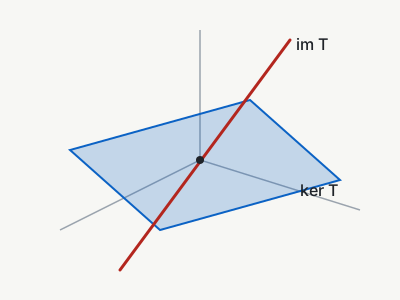{width=240}
:::
Compare @fig-osprey with @fig-kernel.
```
**Reference:** [figures](elements.html#figures).
## References and numbering {#references}
`@id` links to the element with that id, and its text comes from the target. You never type "Theorem 3" or "(2)" yourself, so the numbers stay right when you reorder.
### What a reference says {#reference-text}
| Target | The reference reads |
|---|---|
| a heading | the heading's text |
| a numbered element (with a counter) | its label and number: "Theorem 1", "Figure 2" |
| a numbered equation | "(1)" |
| a titled element without a counter | its title |
| an element with a label but no counter or title | its label: "Proof" |
| anything else | the id |
With no vocabulary, only headings, equations and titles give a reference text:
```tern {.live}
## Kernel and image {#ki}
:::theorem[Rank–nullity]{#thm-rn}
$\dim V = \dim \ker T + \dim \operatorname{im} T$.
:::
$$ e^{i\pi} + 1 = 0 $$ {#eq-euler}
:::aside{#side}
An aside with no title.
:::
See @ki, @thm-rn, @eq-euler and @side.
```
### Why vocabulary matters {#why-vocabulary}
Tern's core knows no theorems, proofs or figures. A *vocabulary* tells it that `theorem` is a numbered `<section>` labelled "Theorem", that `lemma` shares its counter, that a `proof` ends with ∎. The same source as above, with the demo vocabulary:
```tern {.live schema=demo}
:::theorem[Rank–nullity]{#thm-rn}
$\dim V = \dim \ker T + \dim \operatorname{im} T$.
:::
:::proof
Pick a basis of the kernel and extend it.
:::
:::lemma{#lem-inj}
$T$ is injective exactly when $\ker T = \{0\}$.
:::
See @thm-rn and @lem-inj.
```
- **Labels are real text.** "Theorem 1" is in the HTML, so it copies, prints, is found by search and is read by screen readers.
- **Counters are shared by name.** In the demo vocabulary, theorems, lemmas, propositions and corollaries count together, so the lemma above is Lemma 2.
- **Numbering is document-wide**, in the order the elements appear.
[Vocabulary and behaviour](#vocabulary) shows how to declare your own.
### Choosing the text {#ref-option}
`{ref=…}` after a reference picks which part of the target to show:
| `ref=` | Reads |
|---|---|
| `label` | Theorem 1 |
| `number` | 1 |
| `title` | Rank–nullity |
| `full` | Theorem 1 (Rank–nullity) |
```tern {.live schema=demo}
:::theorem[Rank–nullity]{#thm-rn}
…
:::
@thm-rn, @thm-rn{ref=number}, @thm-rn{ref=title}, @thm-rn{ref=full}.
```
For text of your own, use a link to the fragment: `[the main result](#thm-rn)`.
### Things that are not references {#not-references}
- **E-mail addresses** and handles glued to a word: `me@example.org`.
- **`@` before a digit or a space**: `@2024`, `@ home`.
- **`@name` with no such id** stays text, with a warning. Escape it if you meant a mention: `\@alice`.
```tern {.live expect="ref.dangling"}
Write to me@example.org, in @2024. Thanks to @alice and \@bob.
```
A reference runs on through letters, which matters in languages without spaces. End it with `{}`:
```tern {.live}
## 核 {#kernel}
これは@kernel{}です。
```
### Ids are unique {#unique-ids}
Every id names one element. When two elements claim the same id, the first keeps it, the second loses it, and both places are reported. An id you wrote always beats one Tern made up for a heading.
```tern {.live expect="id.duplicate id.duplicate"}
## Kernel
{#kernel}
A paragraph that claims the heading's id: it wins, and the heading becomes `kernel-2`.
{#kernel}
A second claim: this one loses.
```
Four ids belong to Tern itself, for elements it adds to the page: `tern-style`, `tern-color-scheme`, `tern-source` and `tern-diagnostics`. A heading whose made-up id would be one of them gets `-2`; an id you write is dropped, with `id.duplicate`.
```tern {.live expect="id.duplicate"}
## Tern style
{#tern-source}
This paragraph cannot have that id.
```
**Reference:** [references](syntax-inline.html#reference), [reference text](elements.html#references), [numbering](elements.html#numbering), [ids](elements.html#ids), [labels](elements.html#labels).
## Footnotes {#footnotes}
Put `[^label]` where the footnote is referenced, and `[^label]: text` anywhere in the note. Footnotes are numbered in the order they are first referenced and collected at the end, with links back.
```tern {.live}
Subspaces are closed under addition.[^closed] So are kernels.[^kernel]
[^closed]: If $u$ and $v$ are in it, so is $u + v$.
[^kernel]: Every kernel is a subspace.
```
- **Longer footnotes.** Indent continuation lines by two spaces; a blank line followed by an indented line continues the footnote too, so it can hold several paragraphs, lists or code.
- **Labels** can be words or numbers, and their case does not matter: `[^A]` reaches `[^a]:`.
- **Referenced twice**, a footnote keeps its number, and its back link goes to the first reference.
- **Literally:** `\[^1]`, in text or at the start of a line.
```tern {.live}
A claim.[^src] The same source again.[^SRC]
[^src]: The first paragraph of the footnote.
A second paragraph, indented by two spaces.
```
A reference with no definition stays text, with a warning. A definition nobody references is still shown, after the others, with a hint.
```tern {.live expect="footnote.undefined footnote.unused"}
A missing footnote.[^nope]
[^spare]: Nobody points here.
```
**Reference:** [footnote references](syntax-inline.html#footnote-reference), [footnote definitions](syntax-blocks.html#footnote-definition).
## Metadata {#metadata}
A `:::meta` block holds `key: value` lines. Tern writes them into the page's head: the title, the language, and `<meta>` tags for search engines and link previews. Put it first in the note.
```tern {.live}
:::meta
title: Linear maps: kernel, image and rank
lang: en
author: O. Carrera
date: 2026-10-07
description: Lecture 7 of the linear algebra course.
:::
# Linear maps
```
The block shows nothing in the body. What each key does:
| Key | Becomes |
|---|---|
| `title` | the page's `<title>` |
| `lang`, `dir` | `<html lang>` and `<html dir>`; `lang` also picks the language of labels |
| `author`, `date`, `description`, `keywords` | `<meta name="…" content="…">` |
| any other key | `<meta name="key" content="value">` too |
- **No title?** Then the page title is the text of the first `#` heading.
- **Head or `:::meta`.** You can also set these in the head, before the `tern.js` line: `<html lang="en">`, `<title>`. When both set a key to different values, the head wins, with a warning. Set each key in one place.
- **Values are plain text.** No markup is parsed in them.
A repeated key keeps its first value; a line that is not `key: value` is reported; and a `:::meta` inside another block is ignored:
```tern {.live expect="meta.duplicate meta.malformed"}
:::meta
title: First
title: Second
just some words
:::
```
There is no front matter. A note that starts with `---` and `key: value` lines renders them as a rule, a paragraph and a rule, and Tern points to `:::meta`:
```tern {.live expect="doc.frontmatter"}
---
title: Old habits
---
```
**Reference:** [metadata](elements.html#metadata), [`meta.conflict`](diagnostics.html#meta-conflict).
## Raw HTML {#raw-html}
Tern covers most of what a document needs, but the full power of HTML is always there. Raw HTML enters a note through three doors, each kept separate from the Tern around it.
### HTML blocks {#html-blocks}
A line that starts with a block-level or custom tag, such as `<div>`, `<form>`, `<table>`, `<details>`, `<svg>` or `<my-widget>`, starts a raw HTML block. The block runs to the matching end tag, and is emitted exactly as written. `<script>`, `<style>` and comments run to their end tag too.
```tern {.live}
<form class="quiz">
<label>Guess a number <input name="n" type="number" min="1" max="10"></label>
<button type="button">Check</button>
</form>
```
Inside a raw block, nothing is Tern. Markup there is shown as typed, and Tern warns about the first line that looks like Tern, because you probably meant a `:::` block:
```tern {.live expect="html.wrapper"}
<div class="box">
Some **bold** text.
</div>
:::box
Some **bold** text.
:::
```
:::tip
To wrap Tern content in an element, use a `:::` block, not a raw tag: `:::div{.box}` … `:::`. Raw HTML is for HTML you write entirely by hand.
:::
### Inline tags {#inline-html}
Phrasing tags in lower case, such as `<b>`, `<sub>`, `<span style="…">`, `<img>`, `<input>` or a custom element, pass through inside text. Block tags inside a sentence are shown as text, with a hint, and so is anything that only looks like a tag.
```tern {.live expect="html.inline-escaped"}
H<sub>2</sub>O, <span style="color:crimson">red</span>, <b>bold</b>.
A <div> inside a sentence is text. So are Vec<T> and a < b.
```
### The `=html` fence {#html-fence}
For HTML that starts with phrasing content, or that you want to mark plainly as raw, use a fence whose info is `=html`. Its body is emitted as it is, with no `<pre>`.
````tern {.live}
```=html
<b>Bold first</b>, then <i>italic</i>, then a <kbd>key</kbd>.
```
````
### When raw HTML goes wrong {#html-problems}
- **An unclosed `<script>`, `<style>` or comment** would hide the rest of the page, so Tern shows its source in red instead, with an error.
- **A forgotten `</div>`** makes everything up to the next `:::` line, or the end of the note, raw HTML, with an error.
- **An attribute line before raw HTML** stays text, with a warning; put the attributes in the tag.
```tern {.live expect="html.unclosed"}
<script>
console.log('never closed');
```
**Reference:** [raw HTML blocks](syntax-blocks.html#raw-html), [the `=html` fence](syntax-blocks.html#html-fence), [inline HTML](syntax-inline.html#raw-inline-html), [scoping](elements.html#raw-html-scoping), [safe output](elements.html#safe).
## Vocabulary and behaviour {#vocabulary}
Out of the box, Tern knows HTML's names and nothing else. A *vocabulary* (a schema) teaches it your own: which element a name becomes, its label, its counter, its default title, and what script runs on it.
### Declaring a vocabulary in the note {#window-tern}
A note declares its vocabulary in a script in the head, before the `tern.js` line, as `window.TERN.schema`. It has three groups: `block` for `:::` names, `leaf` for `::` names and `inline` for `:` names.
```html
<!doctype html><meta charset="utf-8">
<script>
window.TERN = {schema: {
block: {
theorem: {tag: 'section', counter: 'theorem', label: 'Theorem'},
lemma: {tag: 'section', counter: 'theorem', label: 'Lemma'},
proof: {tag: 'section', label: 'Proof', end: '∎'},
figure: {tag: 'figure', counter: 'figure', label: 'Figure'},
note: {tag: 'aside', label: 'Note'},
},
leaf: {
toc: {tag: 'nav', transform: 'toc', depth: '2-3'},
},
inline: {
term: {tag: 'dfn'},
},
}};
</script>
<script src="tern.js"></script>
# Linear maps
::toc
```
The browser runs that script before `tern.js` loads, so the vocabulary is there when the note is parsed. `tern check`, `tern build` and the language server run it too, so your editor knows the same names.
### The fields {#schema-fields}
Every field is optional.
| Field | What it does | Example |
|---|---|---|
| `tag` | the element, from the HTML names allowed at that level | `'section'`, `'aside'`, `'dfn'` |
| `label` | the label, at the start of a block's title or of a leaf's or inline element's content: a string, a map by language, or a function `(n, node) => text` | `'Theorem'`, `{en: 'Lemma', fr: 'Lemme'}` |
| `counter` | numbers the element; names with the same counter count together | `'theorem'` |
| `ref` | the text of a reference, from `{label}`, `{n}`, `{title}` and `{id}` | `'{label} {n}'` |
| `title` | where the title goes: `'block'`, `'inline'`, `'summary'`, `'figcaption'`, `'caption'` or `'legend'` | `'summary'` |
| `titleDefault` | the title when none is written | `'Details'` |
| `class` | classes added before the author's | `'callout'` |
| `attrs` | default attributes, which the author's override | `{role: 'note'}` |
| `end` | a closing mark, as real text | `'∎'` |
| `body` | `'raw'` keeps the body as text, as `{raw}` does | `'raw'` |
| `transform` | a built-in filler: `'toc'`, with `depth` | `'toc'` |
| `css` | a stylesheet the entry brings | `'.theorem { font-style: italic }'` |
| `dom` | a function run on each element, as `tern.define` (below) | `(el) => { … }` |
A `::toc` leaf declared with `transform: 'toc'` fills itself with the note's headings, levels 2 and 3 by default; `::toc{depth=2}` keeps level 2 only. Here it is with the demo vocabulary:
```tern {.live schema=demo}
::toc
## Kernel
### A basis of the kernel
## Image
```
### Add-ons {#addons}
An add-on is a script, shared by many notes, that declares a vocabulary with `tern.block`, `tern.leaf` and `tern.inline`, and often behaviour and CSS too. List add-ons in `data-use` on the `tern.js` line; a `.css` entry is linked as a stylesheet.
```html
<!doctype html><meta charset="utf-8"><script src="tern.js" data-use="math-vocab.js theme.css"></script>
```
Several read better in a [`:::use` block](syntax-blocks.html#use), one or more per line. It must come first in the note, after `:::meta` at most; both forms are honoured, the tag's entries loading first.
```html
<!doctype html><meta charset="utf-8"><script src="tern.js"></script>
:::use
math-vocab.js
theme.css
:::
```
```js
// math-vocab.js
tern.block('theorem', {tag: 'section', counter: 'theorem', label: 'Theorem'});
tern.block('proof', {tag: 'section', label: 'Proof', end: '∎'});
tern.inline('term', {tag: 'dfn'});
```
When an add-on and the note's own `window.TERN.schema` declare the same name, the note wins: its declaration is the most specific.
- **An add-on that fails** to load, or throws while it runs, is reported as `addon.failed`. The note still renders, with whatever the add-on registered before the error.
- **Under the command line**, a local add-on runs as it does in the browser. A remote one (`https://…`) is not loaded: `tern check` reports `addon.remote`, an info, and does not know the names it declares.
### Behaviour: `tern.define` {#define}
`tern.define(name, fn)` runs `fn(element)` once on every element whose `data-t` is `name`, after the note is rendered and before math is typeset. It is how a name gets behaviour: a chart, a copy button, a quiz. Call it from a script in the note, or give the schema entry a `dom` function.
```tern
::clock
<script>
tern.define('clock', (el) => {
el.textContent = new Date().toLocaleTimeString();
});
</script>
```
`::clock` becomes `<div class="clock" data-t="clock">`, and the script fills it with the time when the note opens. (The live examples on this page never run their scripts, which is why this one is shown as plain source.)
- **Scripts in a note** run after it is rendered, in order, so they find the elements Tern made. `document.write` and `DOMContentLoaded` listeners do not work in them; Tern reports both.
- **Key on `data-t`**, never on the tag: `:::chart` is a `div` today and may be a `section` tomorrow.
- **Events.** `tern.on('ready', fn)` runs after math is typeset; `tern.on('math', fn)` after each round of typesetting.
**Reference:** [schemas](schema.html#schema), [fields](schema.html#fields), [`window.TERN`](schema.html#window-tern), [add-ons](schema.html#addons), [behaviours](schema.html#behaviours), [`tern.define`](api.html#define), [the demo vocabulary](schema.html#demo-schema).
## Styling {#styling}
A note is real HTML, so CSS styles it as it styles any page. Tern ships a small base stylesheet: a readable column, light and dark colours, tables, code, grids and figures.
### Your own CSS {#own-css}
Put a `<style>` block in the note, usually at the end, or link a stylesheet in the head. Your rules come after Tern's, so they win at equal specificity.
```html
<style>
.byline { color: var(--t-muted); margin-top: -1rem; }
[data-t="theorem"] { border-inline-start: 3px solid var(--t-link); padding-inline-start: 1rem; }
[data-t="theorem"] .t-label { font-variant: small-caps; }
.t-cell.muted { color: var(--t-muted); }
</style>
```
### What to select {#selectors}
| Selector | Matches |
|---|---|
| `main.tern` | the rendered note |
| `[data-t="name"]`, `.name` | every element made from a name, whatever its tag |
| `.t-block` | every `:::` block |
| `.t-title`, `.t-label` | a block's title, and its label ("Theorem 1") |
| `.t-end` | a block's end mark (∎) |
| `.t-cols`, `.t-cell` | a grid and its cells |
| `.t-eq`, `.t-eqno`, `.t-math` | display math, its number, any formula |
| `pre[data-lines]`, `.t-line`, `.t-hl` | numbered code, its lines, highlighted lines |
| `.t-ref`, `.t-fnref`, `.t-footnotes` | references, footnote marks, the footnote list |
| `li.t-task` | a task item |
| `.t-error` | content shown in red because of an error |
### Theme variables {#variables}
The base stylesheet reads its colours, fonts and sizes from custom properties. Set them on `:root` to restyle the whole note:
| Property | Sets |
|---|---|
| `--t-bg`, `--t-fg` | background and text colour |
| `--t-muted`, `--t-line`, `--t-soft` | secondary text, borders, code and table backgrounds |
| `--t-link`, `--t-mark` | links and highlights |
| `--t-error`, `--t-error-bg`, `--t-warn` | error colours |
| `--t-code-keyword`, `--t-code-string` … | code colours, for the [code add-on](addons.html#code) |
| `--t-font`, `--t-sans`, `--t-mono` | body, heading and code fonts |
| `--t-width`, `--t-size`, `--t-leading` | column width, font size, line height |
```html
<style>
:root { --t-width: 48rem; --t-font: "Iowan Old Style", Georgia, serif; }
@media (prefers-color-scheme: dark) { :root { --t-bg: #101418; } }
</style>
```
The base stylesheet follows the reader's light or dark preference. Set your dark colours inside `prefers-color-scheme: dark`, as above.
### Themes {#themes}
For a ready-made palette, list a theme from Tern's `themes/` folder as an add-on: Solarized, Gruvbox, Nord, Dracula, One, GitHub, Catppuccin, Tokyo Night, Rosé Pine, Monokai, Everforest, Kanagawa, Sepia and High contrast.
```html
<!doctype html><meta charset="utf-8"><script src="tern.js" data-use="themes/gruvbox.css"></script>
```
`gruvbox.css` follows the reader's light or dark preference; `gruvbox-light.css` and `gruvbox-dark.css` keep one palette for everyone. A theme sets only colours, and your own CSS still wins over it.
An add-on adds CSS with `tern.style(css)`, or with the `css` field of a schema entry.
### Coloured code {#coloured-code}
Tern's code add-on colours fences by their language, with highlight.js, in the theme's colours:
```html
<!doctype html><meta charset="utf-8"><script src="tern.js" data-use="themes/gruvbox.css addons/code.js"></script>
```
A fence then only needs its language, as ```` ```python ````. The [Add-ons](addons.html#code) page has the languages, the colours and how to use it offline.
**Reference:** [styling](schema.html#styling), [themes](schema.html#themes), [add-ons](addons.html#top), [`tern.style`](api.html#style).
## Diagnostics and the panel {#diagnostics}
Whenever Tern meets something it cannot read as you probably meant, it keeps the text visible and reports a diagnostic (rule 7). Each one has:
- a **code**, such as `block.unclosed`;
- a **severity**: error, warning or info;
- a **message** and a **position**, the line and column;
- a **hint** that spells the fix in Tern's syntax.
```tern {.live expect="block.unclosed ref.dangling math.unclosed"}
:::aside
See @nowhere.
$$
x = 1
The aside and the formula are never closed.
```
| Severity | Means | Example |
|---|---|---|
| error | content was lost or its meaning changed | an unclosed block, an unclosed `$$` |
| warning | probably not what you meant | a reference to an id that does not exist |
| info | a hint | `\\` at the end of a line |
### Where they show {#where-diagnostics}
- **The panel.** When you open a note from disk, or from `localhost`, a panel in the corner lists every diagnostic, with its line in the file and its hint. It opens by itself when there are errors. Readers of a published note do not see it. `data-diagnostics` on the `tern.js` line shows it everywhere; `data-quiet` hides it.
- **The console.** One collapsed group, "tern: N problems", is always printed.
- **The command line.** `tern check` prints them as `file:line:col: severity code: message`.
- **The editor.** The language server reports them as you type.
A few problems only the browser can see, such as an add-on that failed to load (`addon.failed`). They join the same list. A [math add-on](addons.html#katex) reports a formula it cannot parse to the console, not as a diagnostic, as the other add-ons do.
**Reference:** [every diagnostic](diagnostics.html#top), [severity](diagnostics.html#severity), [the console and the panel](diagnostics.html#console-and-panel).
## The workflow {#workflow}
The command line, `tern-cli.js`, comes with the repository and runs on Node 22 or later. Below, `tern` stands for `node path/to/tern-cli.js`. Every command takes `--help`.
### Start a note: `tern new` {#tern-new}
```sh
tern new notes/linear-maps.html --title="Linear maps"
```
It writes the first line, with the relative path to the nearest `tern.js` in the note's folder or above, and a `:::meta` block when you give `--title`. It never overwrites a file unless you add `--force`.
| Option | Effect |
|---|---|
| `--title=TEXT` | adds a `:::meta` block with that title |
| `--use=a.js,b.css` | lists add-ons in a `:::use` block |
| `--tern=PATH` | the path to `tern.js`, as written |
| `--guarded` | shows the source as text if `tern.js` cannot load, or if JavaScript is off |
| `--force` | overwrites an existing file |
### Check notes: `tern check` {#tern-check}
```sh
tern check notes/
```
It prints every diagnostic of every note in the folder, with file lines, and exits with 1 when it finds an error, so it can guard a commit or a CI job.
```
notes/linear-maps.html:9:1: error block.unclosed: `:::proof` opened on line 8 is still open at line 11
add `:::` or `:::/proof`
```
`--fail-on=warning` makes warnings fail too; `--quiet` prints only the diagnostics at that level or above; `--json` prints them as data. The position at the start of each line is a line of the file; a line number inside a message counts from the first line of the note.
### In your editor: the language server {#lsp}
`tern lsp` is a language server over stdio, for any editor that speaks LSP. It gives you:
- diagnostics as you type, the same as `tern check`;
- completion of names after `:::`, `::` and `:`, and of ids after `@`;
- go to definition and find references, for ids, footnotes and named closers;
- rename of an id everywhere it is used, never inside code or math;
- hover on a reference, with the target's label and title;
- an outline of headings and blocks, and folding.
:::warning
Turn off automatic line wrapping for notes, and never run an HTML formatter such as Prettier on them. Wrapping breaks one-line constructs. Tern reports a broken block opener or leaf, but a broken table row simply ends the table, and braces pushed to the next line from a heading or a `$$` closer can attach silently to the next block. A formatter rewrites the note as if it were HTML, which nothing can undo.
:::
### Publish a static page: `tern build` {#tern-build}
```sh
tern build notes/linear-maps.html -o site/
```
It writes a page that is already rendered: the HTML is in the file, so it shows at once, and search engines read it without running scripts. The page still loads `tern.js`, which runs behaviours, and it carries the note's source too; its math is typeset at view time only if the note's `data-use` includes a [math add-on](addons.html#katex). `--math=katex` (or `--math=mathml`) typesets the math at build time instead, when the `katex` (or `temml`) package is installed.
- **Where it writes.** Without `-o`, to standard output. `-o site/`, with a trailing `/` or naming an existing folder, writes `site/linear-maps.html`, creating the folder. Any other `-o` is the output file, and missing folders on its path are created.
- **Relative paths** are kept as written, so build into a folder where `tern.js`, images and add-ons resolve the same way.
**Reference:** [command line](tools.html#top): [new](tools.html#new), [check](tools.html#check), [parse](tools.html#parse), [build](tools.html#build), [the language server](tools.html#lsp), [editor setup](tools.html#editors).
## Publishing {#publishing}
A note is a static file. Publishing it means putting it, with `tern.js` and whatever it links to, on any static host.
1. **Keep paths relative.** Upload the note with `tern.js`, add-ons and images in the same places relative to it.
2. **Any static host works**, GitHub Pages included. There is no server code.
3. **Or build it.** `tern build` makes a page that shows its content before scripts run, which suits search engines and slow connections.
4. **Math.** Load a [math add-on](addons.html#katex) in `:::use` or `data-use` to typeset formulas; `addons/katex.js` fetches KaTeX from a CDN. For offline use, point the add-on at a copy you host with `?base=`, or pre-render with `tern build --math`.
5. **Content Security Policy.** Under a strict policy, link `tern.css` from the head, so that Tern does not need to inline its styles; the CSP section has the details.
6. **Trust.** A note is a web page: its scripts and raw HTML run with the page's rights. Open notes you trust.
**Reference:** [publishing](publishing.html#top): [hosting](publishing.html#hosting), [GitHub Pages](publishing.html#github-pages), [building](publishing.html#build), [CSP](publishing.html#csp), [KaTeX](publishing.html#katex), [offline](publishing.html#offline), [browsers](publishing.html#browsers), [trust](publishing.html#trust), [when it does not render](publishing.html#troubleshooting).
## Where next {#next}
- **The examples** are complete notes, each declaring its own vocabulary: [a lecture](../examples/lecture.html), [a cheat sheet](../examples/cheatsheet.html), [media](../examples/media.html), [code](../examples/code.html), [a page layout](../examples/layout.html). Open their source next to the result.
- **The reference** covers every rule and edge case: [blocks](syntax-blocks.html#top), [inline](syntax-inline.html#top), [elements and output](elements.html#top).
- **Vocabulary** in depth: [schemas, add-ons and behaviours](schema.html#top).
- **Every diagnostic**, with its fix: [diagnostics](diagnostics.html#top).
- **Scripting** a note: [the JavaScript API](api.html#top).